In February, I published how I build software with AI coding agents. Eight months later, I direct the agents much less. I agree on a goal, and the agents implement, test, deploy and fix their own work inside an environment with strong conventions and fast feedback. This post explains what changed, where I still stay in the loop, and why my own attention is now the real limit.
These days, I often build software from my phone, mostly by talking. I connect over SSH to a machine that runs several Claude Code and Codex sessions, each one on a different project. Some are implementing features, some are fixing issues, and some are deploying to production. I move between these conversations: I answer a question, discuss a new idea, or ask for a second opinion. Most of the time, the agents just keep working.
I haven’t opened an IDE in a long time. But that is not the interesting part. Eight months ago, I had already stopped writing code, and I only read it where the risk demanded it. Today I rarely read it. What really changed is how much freedom I give the agents, and how little I need to direct their work.
ℹ️ Where this applies
This is about my own projects: small teams and products I build and run myself. I choose the stack, the conventions and the infrastructure, and I don’t need agreement from a large organization. I would not assume the same approach works unchanged in a company with hundreds of developers, legacy systems and strict security policies. I will write about larger organizations in future posts.
What changed, in one table
| February 2026 | October 2026 | |
|---|---|---|
| Planning | Plan Mode: a detailed plan that I review | A conversation, then a goal and constraints |
| Execution | Small tasks, one by one | The agent runs the full cycle, up to production |
| Verification | I check each step and approve each merge | The harness checks. I test and approve critical paths |
| Production errors | I investigate | An agent investigates, fixes and deploys again |
| Where I work | A terminal on my desk | herdr over SSH, often from my phone |
| How I give instructions | Keyboard | Voice, and a small game controller |
| The limit | Time to review the agents’ work | My attention across many projects |
From directing the steps to agreeing on the goal
In my previous post, I spent a lot of time on Plan Mode. Before implementing anything, the agent explored the problem and proposed a detailed plan. We reviewed it together, and only then did it start coding. I barely use Plan Mode anymore. Not because planning no longer matters, but because the models are much more capable now, and my workflow has changed with them.
Today, I usually start with a conversation: “I’d like to build this. What do you think? How would you approach it?” We discuss trade-offs, architecture choices and possible problems. Sometimes I challenge its assumptions. Sometimes it challenges mine. Once we agree, I tell it to go ahead, and I mean the full cycle: implement it, test it, validate it, deploy it, and make sure it works in production.
I don’t review detailed implementation plans. I don’t break the work into small tasks, and I don’t say which tests to write. I care about the goal, the constraints, and the few architecture decisions that really matter. The agent does the rest.
When I revised the previous post in October, I wrote “Sign the plan” and “Let the harness check the rest.” That is still the principle. What changed is the balance between the two. The harness grew so much that the plan I need to sign became much smaller: a goal, some constraints, a few decisions. And because the harness now covers deployment and production too, I no longer approve each merge myself. I approve the direction, and the harness decides if a change is ready. The exception is critical paths: there, I test the change myself and approve it explicitly.
Where I spend my time
The harness, group by group
There is a reason I can work this way, and it is not only that the models are smarter. I have invested a lot in what surrounds them. I call it the harness: the stack, conventions, tools and checks the agents work inside. Most of the recurring engineering decisions are already made before an agent starts a task. It has four parts.
1. Knowledge and conventions
I use a very opinionated technology stack. My projects share conventions, architecture patterns, a design system, documentation standards and development practices. The agents record architecture decisions in ADRs, keep project knowledge and memory up to date, and know where to find what they need.
2. Development and checks
The agents can run each application locally, use Makefiles and run the relevant tests. Unit tests, end-to-end tests and property-based tests are all available. The harness sets the expectations, but the agent decides which techniques make sense for the change it is making.
3. Operations and observability
The agents have operational skills too. They read logs, query Grafana, investigate Sentry issues, work with the infrastructure and deploy to production. The goal of all these tools is one question the agent can answer on its own: how do I know that what I built really works? And when the answer is “it doesn’t”, it has what it needs to find out why.
4. Continuous improvement
I am not the only one who maintains the harness. The agents update conventions, refine skills, improve documentation, extend tools and add checks as the projects evolve. When a recurring issue shows a missing check, they add one. The better the harness gets, the more autonomy the agents can have, and the more they work, the more chances they have to improve the harness.
There is one rule that matters more than the others. Technically, an agent could change the checks that judge its own work. It must not remove or weaken a check without asking me, and the agents know this rule because it is written in their instructions.
Feedback loops instead of supervision
There is a lesson here that surprised me. The more autonomy I give the agents, the more opinionated I become about the environment they work in. I am not opinionated about each implementation decision. I am opinionated about the architecture, the quality requirements, the tools, the observability, and the ways agents can check their own work.
My deployment process is a good example. It supports repeated deployments and blue/green deployments. That is not only an operational convenience. It is a deliberate choice to support autonomous work: an agent should not wait for me to validate each change. It should be able to deploy, observe the system, find unexpected behavior, fix it and deploy again. In the same way, Sentry, logs, metrics and automated checks are not only safeguards. They are the feedback that lets agents iterate without a person in the loop.
Agents are very good at diagnosing problems when they have all this information. They connect an error in Sentry with the relevant logs, read the code around it, check the deployment history and follow the problem across the system. Sometimes they find the cause faster than I would, because they can read all the relevant context at once.
A real example from my projects: a scheduled job checks Sentry every few minutes. When a new error appears, an agent investigates it, finds the cause, fixes it and deploys again. All of this happens without me. I see it afterwards.
-
Step 1
New error
A scheduled job checks Sentry every few minutes.
-
Step 2
Investigate
The agent reads the error, the logs, the code and the deploy history.
-
Step 3
Fix and test
It finds the cause, changes the code and runs the checks.
-
Step 4
Deploy
Blue/green, so a bad deploy can roll back.
-
Step 5
I read it later
What broke, why, and what changed.
↻ If the error comes back, the loop starts again.
This does not mean agents never make mistakes. It means my goal is no longer to prevent every mistake through supervision. It is to give agents the ability to detect, understand and correct their own mistakes.
Where I stay in the loop
Less supervision does not mean no supervision. These are the places where I still decide:
| Situation | Who decides | What happens |
|---|---|---|
| A routine change | The harness | Tests, checks, deployment and production signals decide. I read the summary. |
| A critical path | Me | I test the change myself and approve it explicitly. |
| A change that removes or weakens a check | Me | The agent must ask me first. |
| A decision that is hard to undo | Me, with a second opinion | I ask a different model to challenge the approach. |
| An error in production | An agent | It investigates, fixes and deploys again. I see it afterwards. |
One habit I kept, and value more every month, is adversarial review. My main environment is Claude Code with frontier models, but I often ask other models, in particular Codex, to challenge the work. Not only the code: I want them to question assumptions, find weak points in the architecture, propose other approaches and find what the first agent missed. Often, the most useful feedback is not “this function has a bug”. It is “are you sure this is the right approach?”
I prefer a different model for this, because different reasoning patterns and different biases make the review more useful. For now, I ask for these reviews explicitly. They are not an automatic step in the harness yet. The point is not a committee of agents that argue forever. It is to bring in independent critical thinking when it matters.
My setup: phone, voice and herdr
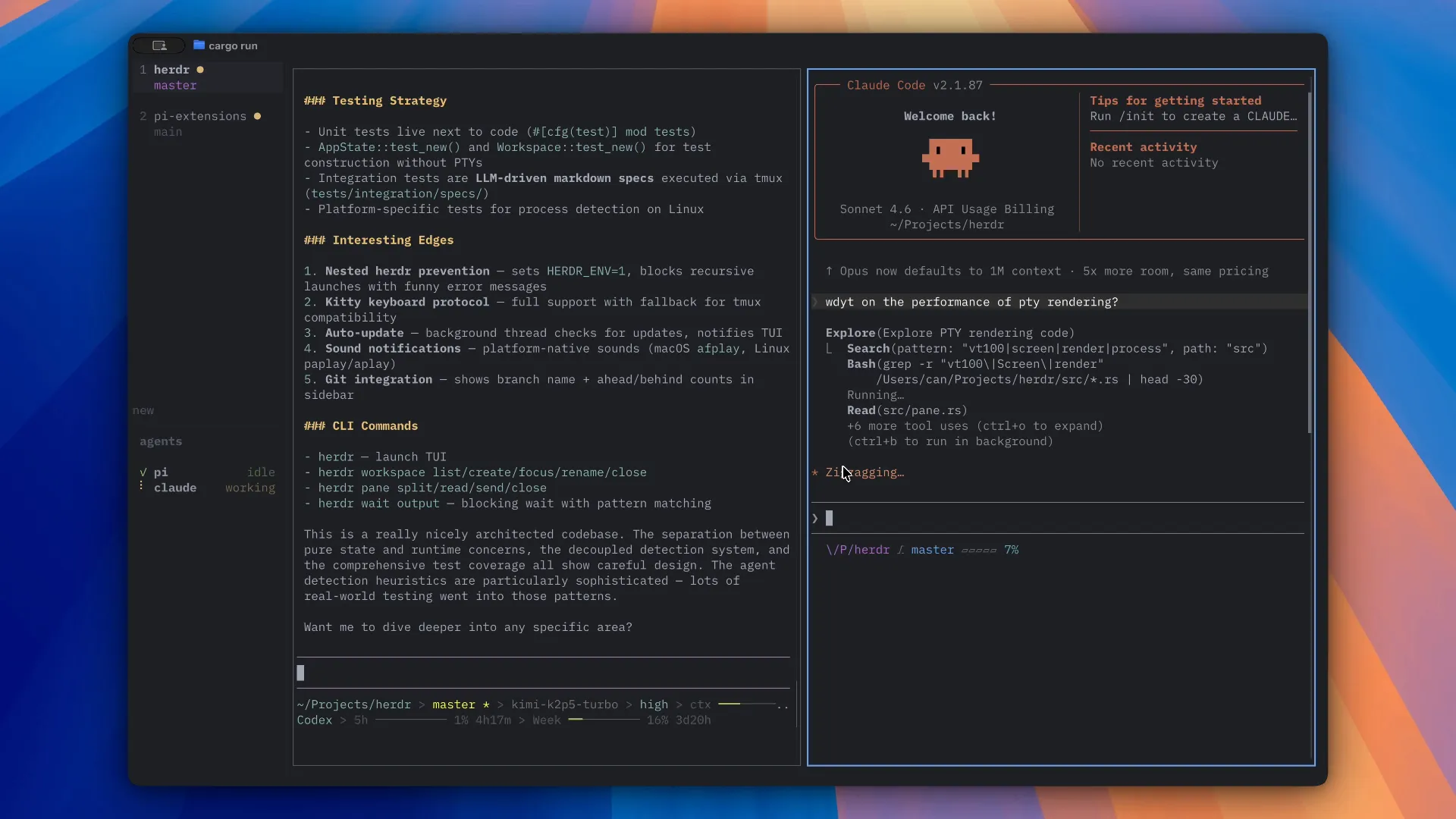
My main development interface is no longer an IDE, or even a normal terminal on my desk. I use herdr, a terminal application that manages many agent sessions across projects. I run it locally or on a remote server, and I usually connect from my phone over SSH, through Tailscale. This gives me a private connection without exposing SSH to the public internet.
Me
- Clip-on microphone + Wispr Flow (voice to text)
- 8BitDo Micro controller (talk, send, switch agent)
- Phone or laptop
Connection
- Tailscale private network
- SSH, never open to the internet
Machine (local or remote)
- herdr: all sessions, with their state
- Claude Code and Codex sessions, one or more per project
- Each one builds, tests and deploys
herdr helps me manage my attention. Each project has its own sessions. herdr orders them by latest activity and shows whether an agent is working, has finished, or needs my input. On the desktop, notifications and sounds tell me when something needs attention. On the phone, the session list does the same job, so I don’t have to check every session all the time.
I also stopped typing most of the time. I use a clip-on microphone and Wispr Flow, on both my phone and my computer, and I talk to the agents. This changed more than I expected. When I speak, I give much more context: why I want something, what worries me, what I tried before. Typing pushed me to write short instructions. Speaking feels like explaining a problem to a colleague, and that is exactly the kind of conversation that works best with these agents.
💡 A geeky detail: a game controller for agents

I also use an 8BitDo Micro, a very small Bluetooth game controller. I hold it in one hand, and its buttons do the few things I repeat all day with the agents:
- Hold one button to talk to the agent.
- Press another to send the message.
- Press two others to move to the previous or next agent.
With one hand and no keyboard, I can go from agent to agent, read where each one stopped, and orchestrate them by voice.
These tools are not the reason the approach works. They only reflect how my work has changed: I no longer move through codebases. I move through conversations, decisions and projects.
The new limit: my attention
This brings me to something I did not expect. When agents can implement, test, debug and deploy on their own, many more things can run in parallel. To give an idea of the scale: in the last 30 days, on my laptop alone, agents worked on about 20 software projects, usually 4 on a given day and up to 9. They made about 600 commits and ran about 170 deployments. At busy moments, up to 9 sessions ran at the same time. These numbers do not include the sessions on my remote server.
For someone who loves building things, this is great news. Ideas were never my limit. I have more things I want to build than I could ever finish with traditional development, and execution is now much cheaper.
But it creates a new problem: context switching. When many agents work across many projects, the challenge is no longer to keep them busy. It is to keep myself informed enough to make good decisions when they need me. Each conversation has its own history, architecture context, product decisions and open questions. Moving from one project to another is not free, even when the agents do all the implementation work.
I am more and more convinced that managing human attention will be one of the most interesting problems in agentic software development. Not how to make agents write more code, but how to help people keep direction, context and judgment while many autonomous processes move forward at the same time.
If you want to try this
You don’t need my exact tools. These are the steps that mattered most, in the order I would take them:
- Choose one stack and one set of conventions, and write them down where the agents read them. Every decision you make once is a decision the agent doesn’t have to guess.
- Give the agents the same feedback you use. Running the app locally, tests, logs, error tracking, and a safe way to deploy and roll back.
- Decide in advance where a person stays in the loop. Write it as a rule (critical paths, hard-to-undo decisions), not as a feeling.
- Protect the checks. Agents can add checks. Removing or weakening one needs a person.
- Close one loop end to end before you widen autonomy. Production errors are a good first loop: detect, investigate, fix, deploy.
- Watch your own attention, not only the agents’ output. It becomes the limit faster than you think.
Where this is going
Eight months ago, most of my thinking was about guiding agents through a disciplined engineering process. Today, it is about building an environment that lets them run that process on their own. The engineering discipline has not disappeared. It has moved into the system around the model, and as models get more capable, I think this trend will only grow.
Less time telling agents how to build things. More time deciding what deserves to be built, and designing the environment that lets them build it well. I have never enjoyed building software more.