Context
Who I am
I’m Victor Martin Garcia. I’ve been building software for over 25 years. I’ve written code, built teams, taught at university, and led companies. What excites me most right now is exploring how AI is changing the way we work as developers.
What follows is my real process for building with AI. What works, what doesn’t, and what I’ve learned from shipping real products this way.
Vibe coding vs. agentic engineering
There’s a distinction worth making upfront, because it’s the difference between mediocre results and professional ones.
Vibe coding is throwing prompts at a model, accepting whatever comes back, and moving on without reviewing it carefully. It works for quick prototypes and personal experiments. It doesn’t work for software that goes to production.
Agentic engineering is something different. Here the AI executes tasks under rigorous human oversight. You define the intent, set quality standards, review every result, and maintain architectural control over the project. The agent is a highly capable executor, but you remain the director.
⚠️ Caution
If you’re accepting code without understanding it, you’re not moving faster. You’re accumulating technical debt faster. Everything that follows in this guide assumes you want to work the second way.
A note for junior developers
⚠️ Caution
AI amplifies what you already know. For a senior, that means multiplying productivity by two, three, or five times. For someone just starting out, the risk is different.
If you accept code from the agent without understanding what it does, you’re not learning. You’re creating the illusion of competence. The code works, the test passes, the PR gets merged. But if someone asks you why it works, you have no answer.
AI is an extraordinary learning tool if you use it actively. Ask it to explain every decision. Ask it why it chose that pattern and not another. Ask for alternatives and compare them. Use the agent as a patient mentor that answers any question without judgment.
What you can’t do is use it as a shortcut to skip the learning. Fundamentals matter. Algorithms, data structures, design patterns, how the network works, how databases work. Without that foundation, you can’t evaluate what the agent produces. And if you can’t evaluate it, you can’t direct it.
The shift in role
Working with agents fundamentally changes what you do as a developer. You go from being the one who implements to being the one who directs. Your day-to-day looks less like writing code and more like clarifying intent, reviewing architecture, and refining quality.
This doesn’t mean you stop thinking technically. Quite the opposite. You need more technical judgment than ever, because you’re constantly making design decisions and evaluating whether what the agent produces is correct, efficient, and maintainable.
AI also helps with parts of the cycle we used to ignore or do reluctantly: analyzing requirements, generating exhaustive test cases, writing documentation, parsing deployment logs. It’s not just an implementation tool. It’s an assistant across the entire software lifecycle.
On tooling
Right now I use Claude Code as my primary AI coding assistant. But the tool isn’t what matters. Everything in this space moves so fast that what I use today may not be what I use next month.
I’m not affiliated with Anthropic, OpenAI, or any AI company. I simply use what works best for me right now and share what I discover along the way.
The Process
Setup
What you configure once and carry into every project. These decisions define how you’ll work with agents before you write the first line of code.
1. How to think about agents
Before getting into concrete steps, it’s worth pausing to understand what we’re actually working with.
ℹ️ Note
Think of agents as extremely smart people who know about everything, but who start from scratch every single time. They don’t remember what you did yesterday. They don’t know which project you’re in. They don’t know your previous decisions or your preferences.
Your job is to give them exactly the right context so they can make good decisions with the correct information. Not too much (they get lost), not too little (they make things up).
The good news is that code already contains a lot of implicit context. Agents are very good at navigating files, reading existing code, and extracting what they need on their own. Often it’s enough to point them in the right direction and let them discover the rest.
2. Capturing your full intent
One of the most common mistakes when starting with agents is jumping straight to asking them for code. Before writing a single line, you need to be clear about what you want to build. Not at the level of “I want a todo app,” but at the level of concrete decisions: what it does exactly, what it doesn’t do, how it behaves in each case.
The gap between what’s in your head and what the agent understands is the main source of problems. If something is ambiguous or underspecified, the agent will fill in the blanks with its own assumptions. Sometimes it gets it right. Often it doesn’t.
Spec-first discipline. Before asking the agent for anything, write a mini design document. It doesn’t need to be formal. A clear description of the problem, the functional requirements, the technical constraints, and the edge cases you can think of is enough. Think of it as “a waterfall in 15 minutes”: you define the what before touching the how. This document becomes context you can pass to the agent alongside your prompt.
The reverse interview. Instead of trying to anticipate every possible question upfront, you can ask the agent to interview you.
💡 A prompt I use often
Interview me in detail using AskUserQuestionTool about literally everything you need: clarifications on features, technical implementations, UI/UX experience, concerns, tradeoffs, etc. Make sure the questions are not obvious.
It’s much easier to answer specific questions (especially when the agent offers you several options to choose from) than to think ahead of every possible ambiguity. The agent surfaces doubts you didn’t know you had, and you end up with a shared understanding that’s far more precise.
Plan mode. Some agents, like Claude Code, have a mode where the agent explores the code, thinks through the problem, and presents a detailed implementation plan for you to review before it writes anything. You read the plan, approve it, request changes, or reject it entirely. It’s like a code review before the code exists.
All three techniques aim for the same thing: reaching a shared understanding before the real work begins. The design document works well when you need to think through the problem yourself first. The interview works when you’re still shaping the idea. Plan mode works when the idea is clear but the implementation is complex.
3. Choosing your stack
Before writing code, there’s a decision that shapes everything that comes after: choosing the right technologies. This isn’t about using the newest or most popular thing. It’s about having the technical judgment to know which tool best solves the specific problem in front of you.
AI can help you implement almost anything, but it won’t make that decision for you. If you choose the wrong foundation, everything you build on top will be harder than it needs to be. That said, if you don’t have the necessary experience in a particular area, AI itself is a good starting point. You can ask it, explore options with it, ask it to compare alternatives. It doesn’t replace your judgment, but it helps you form it.
There’s a factor that didn’t exist before: it’s worth choosing technologies that are well-known and mainstream enough for AI agents to handle fluently. If you use something very niche or very new, the AI will stumble more, make things up, and slow you down instead of helping.
| What I want to build | Technology I’d choose | Why |
|---|---|---|
| Static site or landing page | Astro + Tailwind | Simple, fast, agents know it very well |
| Interactive web app | Next.js + React + Tailwind | The most documented ecosystem, AI masters it |
| UI / Design System | Preline UI, DaisyUI, shadcn/ui | Agents think at the component level. With these frameworks they compose interfaces almost automatically |
| API / backend | Node.js (Express or Fastify), Python (FastAPI, Django) | Large communities, thousands of examples in model training data |
| Data Science / AI | Python (pandas, scikit-learn, PyTorch) | No real alternative. It’s the ecosystem language and AI knows it inside out |
| Mobile app | React Native or Flutter | Mainstream, well-documented, good agent coverage |
| CLI or internal tool | Python or TypeScript | Agents are especially good with scripts and tooling |
| Database | PostgreSQL | The standard. AI writes SQL for Postgres better than for anything else |
| Infrastructure | Terraform + AWS/GCP | Very well-documented, agents generate reasonable configurations |
⚠️ Caution
This is not a closed list or a universal recommendation. It’s what works for me today.
4. The AGENTS.md file
Every AI agent I know of lets you define a context file that loads automatically every time it starts working. In Claude Code it’s called CLAUDE.md, in Cursor .cursorrules, in others it will have a different name. The most common name across the community is AGENTS.md. The concept is the same: a document that gives the agent the minimum necessary context to understand your project and make good decisions.
A good way to think about this file is to ask yourself: what would you tell a new team member on their first day?
You’d usually explain two things. First, how the project is set up: a technical overview of the main pieces, how they connect, which technologies are used, where everything lives. Second, the team’s agreements: the explicit and implicit rules everyone needs to know to work well together. What processes we follow, what quality standards we apply, what language we write commits in, how we name things, what’s off-limits.
That’s exactly what your agent file should contain. Nothing more, nothing less. If you overload it with too much detail, the agent loses focus. If you leave it too sparse, it will make decisions without context and you’ll have to constantly correct it.
Beyond the base file, you can (and should) pack additional context into your prompts when relevant: existing code snippets, API documentation it needs to consume, reference implementations, or examples of how you solved something similar before. This context packing is what separates a mediocre prompt from one that produces excellent results on the first try.
⚠️ What NOT to include in context
Never paste credentials, API keys, access tokens, personal user data (PII), or proprietary algorithms into your prompts or agent files. Everything you pass to the agent travels to external servers. Treat agent context with the same caution you’d apply to a public repository.
5. Keeping agents up to date
Every LLM is trained on data up to a specific cutoff date. In practice, this means the agent’s knowledge of frameworks and libraries is frozen in time, often months behind. When you ask it to write code, it will default to the version it last saw during training. This can lead to deprecated APIs, outdated patterns, or subtle bugs that are hard to catch.
The good news is that modern agents can search the web. If they know their knowledge might be outdated, they can look up current documentation on their own. The key is making them aware of the problem so they actually do it.
💡 Context7 MCP
One trick that works really well for me is using Context7 as an MCP server. Context7 indexes technical documentation for most popular libraries and serves it in a format optimized for agents: fast searches, minimal token consumption, always up to date. Instead of the agent guessing from its training data, it consults the actual documentation for the exact version you’re using.
6. Tests, quality, and the feedback loop
ℹ️ Note
Without tests, you can’t delegate anything with confidence. Tests aren’t an extra. They’re the infrastructure that makes everything else possible.
When an agent modifies code, you need an objective way to know whether what it did worked or broke something. Without automated tests, that verification falls entirely on you, manually reviewing every change. That doesn’t scale. Tests are what let you delegate safely.
But tests aren’t just for you. They’re the feedback mechanism the agent itself uses to self-correct. The agent writes code, runs the tests, sees what fails, and fixes it. This cycle only works if tests exist and are reliable. Without them, the agent has no way to know if its code works beyond “it compiles without errors.”
Define in your AGENTS.md what kind of tests you expect (unit, integration, e2e), which framework to use, and what the minimum acceptable coverage is. The agent will follow these rules consistently.
The same principle applies to all other quality standards. Everything you’d normally put in a pre-commit hook belongs here: linters, code formatting, vulnerability checks. The key insight is that these checks aren’t just quality gates. They’re automatic feedback that the agent consumes. If a linter fails, the agent fixes the code. If a test doesn’t pass, it fixes it before moving on. If a security scan detects a vulnerability, it resolves it.
The full flow works like this: the agent writes code, the checks run, if something fails the agent receives the error and corrects, then repeats until everything passes. It’s a closed loop where quality standards act as signals guiding the agent toward the correct solution.
💡 Basic pre-commit example
# .pre-commit-config.yaml
repos:
  - repo: https://github.com/pre-commit/pre-commit-hooks
    rev: v4.6.0
    hooks:
      - id: trailing-whitespace
      - id: end-of-file-fixer
      - id: check-merge-conflict
  - repo: https://github.com/astral-sh/ruff-pre-commit
    rev: v0.7.0
    hooks:
      - id: ruff          # linter
      - id: ruff-format   # formatter
  - repo: local
    hooks:
      - id: tests
        name: run tests
        entry: pytest --tb=short -q
        language: system
        pass_filenames: false
        always_run: true
With something like this in place, the agent gets immediate feedback every time its code doesn’t meet your standards.
The relationship between your AGENTS.md and your quality standards should be explicit. In AGENTS.md you define the rules (“use Ruff for linting, pytest for tests, minimum 80% coverage”). In the pre-commit hooks you make them enforceable. The agent reads the rules and respects the hooks. Both pieces work together.
7. Skills
Skills are tools or interactions you define so the agent always has them available and uses them consistently. Instead of explaining every time how you want something done, you define it once and from then on it’s always done the same way.
💡 Example skill definition
# /commit skill
When I ask you to commit:
1. Run the tests (`yarn test`)
2. If they pass, `git add` the relevant files
3. Write a commit message in English, conventional commits format
4. Push to the current branch
5. If tests fail, fix them before continuing
Skills are simply structured instructions. There’s no magic. But turning a repetitive instruction into a skill saves time and guarantees consistency.
These are the three I use constantly:
Browser with Playwright
Using Playwright with playwright-cli open --headed to open a shared browser session. The agent navigates, clicks, fills out forms, and takes screenshots, while I watch everything in real time and can step in whenever I want. The agent gains eyes and can see misaligned buttons, incorrect colors, or console errors, and fix them without me having to describe the problem.
Tests and documentation
Every change comes with its corresponding tests. What kind, what coverage, what framework: all defined in AGENTS.md. Documentation works the same way. I use Mermaid for diagrams, and the agent generates and updates architecture diagrams, data flows, and sequences automatically.
Git and pull requests
When a feature is done, the agent handles the entire Git flow: commit, push, and pull request with the correct format. Before all of that, it makes sure the tests pass. The commit format, PR structure, and description content are defined in the skill and followed consistently.
Day to Day
The workflow that repeats every time you sit down to build something with agents.
1. The iterative work loop
This is where many beginners get frustrated. They throw a long prompt at the agent, expect perfect code back on the first try, and get disappointed when that doesn’t happen.
The real flow is a loop: prompt, review, correct, refine. First results are almost never perfect, and that’s completely normal. What matters is that each iteration improves the result, and you typically converge on something good within two or three cycles.
The key is working in small vertical slices. Instead of asking for “implement the entire authentication system,” ask first for the user model, then the registration endpoint, then the login endpoint, then the session middleware. Each piece is small enough for the agent to do well, and concrete enough for you to verify quickly.
💡 Tip
Large, monolithic requests produce mediocre results. Small, focused requests produce excellent results. This is the most important thing you can learn about working with agents.
2. Granular commits as save points
Treat each commit like a save point in a video game. When the agent completes a small task and the tests pass, commit. If the next task goes wrong, you can return to the last stable point with a simple git checkout.
This habit matters more than it seems. Agents sometimes go off track: they start refactoring things you didn’t ask them to, change the signature of existing functions, or introduce unnecessary abstractions. If you’ve been committing frequently, the damage is limited to the last step. If you’ve gone an hour without committing, you could lose all that progress.
A good rule: one commit per completed task. Don’t let changes pile up. The cost of committing is practically zero. The cost of losing work is not.
3. Never merge code you don’t understand
⚠️ Caution
This is the most important rule in the entire guide. If you only take one thing from here, make it this.
The code the agent produces is your responsibility. If it gets to production and fails, you can’t say “the AI wrote it.” You sign every merge. You’re accountable for every line.
In practice this means: if you read the agent’s code and something seems confusing or unnecessarily complex, don’t accept it. Ask it to explain. If the explanation doesn’t convince you, ask it to rewrite it more clearly. If you’re still not satisfied, reject it and write it yourself.
This applies especially to patterns the agent introduces without being asked. If you see an abstraction and don’t understand why it exists, ask. If you see a design pattern that seems excessive for the problem, simplify it. Your judgment is what matters.
4. Verifying agent output
Agents hallucinate. It’s a known behavior, and it’s worth understanding well so you can detect it.
The most dangerous hallucinations aren’t the obvious errors that break compilation. They’re the subtle ones: the agent uses an API that looks correct but doesn’t exist in the version you’re using. It calls a method with the right signature from a previous version. It imports a package that existed once but is now deprecated. Everything compiles, the types check out, and the error only appears at runtime.
How to verify:
- Tests. Your first line of defense. If the agent’s code doesn’t pass the tests, there’s a clear problem.
- Manual review. Read the code as you would in a code review from a colleague. Pay particular attention to imports, external API calls, and business logic.
- Cross-review with another model. You can use a different model to review the code generated by the first one. Each model has different biases, and a second pair of eyes (even artificial ones) catches errors the first one misses.
- Actual execution. When possible, run the code and test it manually. Tests cover the cases you anticipated. Real execution covers the ones you didn’t.
5. Context management and multi-agent mode
Long conversations with an agent degrade the quality of its responses. As the context window fills up, the agent starts “forgetting” earlier decisions, contradicting itself, and losing track of details. This phenomenon is called context drift, and it’s one of the main reasons working with agents gets complicated on large tasks.
The simplest solution: start fresh conversations for each new feature. Don’t try to do everything in one marathon session. Each new conversation starts with a clean context window and the agent operates at full capacity.
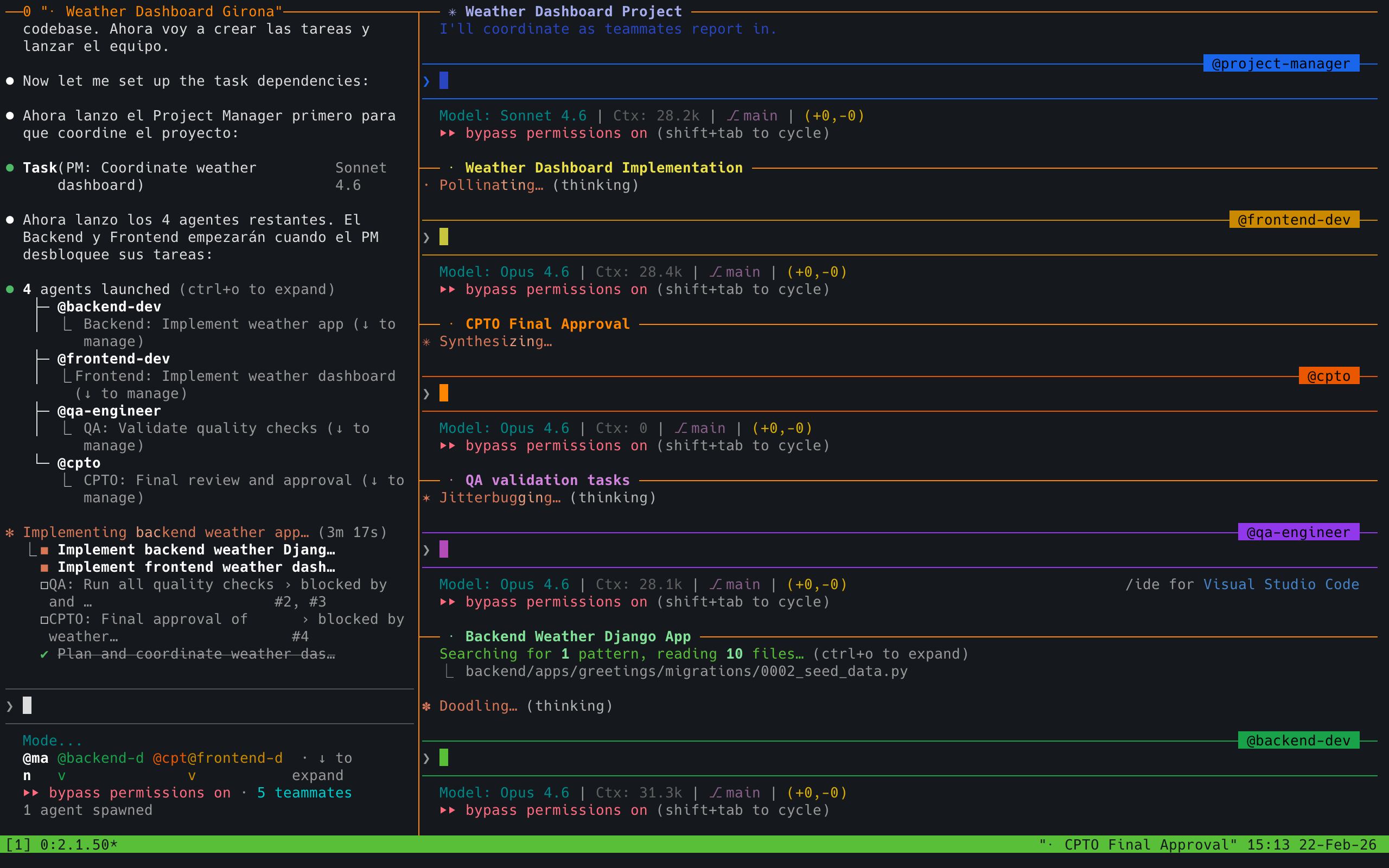
The more powerful solution: multi-agent mode. Some tools support this natively. In Claude Code, for example, you can spin up and coordinate multiple agents working from a shared plan.
The best way to think about it is like leading your own team. You define the goal, break it down into roles, and assign each agent a part of the work. One handles the backend, another the frontend, a third writes tests. They work simultaneously, and you coordinate from above.
The obvious advantage is speed. But the real advantage is that each sub-agent receives a smaller, more focused slice of the problem. They can go much deeper on their specific task without hitting context limits. It’s the same reason human teams work better when each person owns a clear piece instead of everyone trying to keep the full picture in their head.
💡 Example multi-agent prompt
Implement the plan with a team of 5 agents:
- Project Manager - Tracks the project, shows progress, and assigns tasks to the other agents
- Backend Developer - Implements code following backend best practices
- Frontend Developer - Implements code following frontend best practices
- QA - Ensures functionality is delivered to the expected quality and performance standards
- CPTO - Ensures we can deploy the feature, both at the technical quality level (meets pre-commit agreements, no security vulnerabilities) and at the product level by verifying the delivered software meets the expectations specified in the requirements files
The Project Manager agent starts first, the others depend on it. Once all work is complete, the CPTO agent approves it.
You don’t need to use these exact roles. The important thing is that defining clear responsibilities from the start gives each agent a well-scoped mission. It mirrors how a real team operates, and agents understand these roles naturally.
6. When NOT to use AI
AI isn’t the answer to everything. Recognizing its limits saves you time and frustration.
- Critical security code. Cryptography, custom authentication, token validation. Mistakes here have serious consequences, and agents don’t have the full context of your threat model.
- Tightly coupled legacy code. If the codebase has implicit dependencies everywhere and changing one line breaks three modules, the agent will need more context than you can give it. Sometimes it’s faster to do it by hand.
- Performance hot paths. When every microsecond matters, you need to profile, measure, and optimize with real data. The agent can suggest generic optimizations, but the ones that actually matter require execution context the agent doesn’t have.
- Exploratory research. When you don’t yet know exactly what you want to build and need to experiment with half-formed ideas, working with the agent can be slower than thinking with pen and paper.
Risks and Challenges
Remember: this isn’t magic. Working with AI has real risks worth knowing about before they find you.
Team-Related
📈 Learning curve
Adopting coding agents takes time. Not everyone on the team will progress at the same pace, and productivity may dip before it rises.
🤝 Rethinking team agreements
Code reviews, commit standards, code ownership… many agreements that worked before need revisiting when an agent enters the equation.
🚫 Resistance to change
Not everyone will want to change how they work. Some will see it as a threat, others as a passing trend. Forced adoption doesn’t work.
🎯 Misaligned expectations
If management expects 10x productivity from day one while the team is still learning to write good prompts, the clash is inevitable.
Inherent to AI
🌀 Hallucination
Models make things up with total conviction. APIs that don’t exist, fictional libraries, patterns that sound right but don’t work. We covered this above, but it bears repeating: always verify.
🔓 Data leakage
Everything you pass to the agent leaves your machine. Proprietary code, client data, credentials forgotten in the context. Be clear about what you’re sending and where it goes.
😤 Model assertiveness
Agents rarely say “I don’t know.” They prefer giving you a confident answer even when it’s wrong. This apparent confidence makes it easy to let your guard down.
🧠 Loss of human skills
If you let the agent do everything, your own skills atrophy. Critical thinking, problem solving, the ability to debug without help. Use it as a tool, not a crutch.
🗑️ AI Slop
Generic, over-engineered code full of obvious comments and unnecessary abstractions. The default style of models tends toward verbosity. If you don’t actively prune it, your codebase fills with noise.
Closing Thoughts
If I had to summarize all of this in a few lines, it would be this:
- Understand what you’re working with. This isn’t vibe coding. It’s agentic engineering: you direct, the AI executes.
- Prepare the ground before writing code. Clear intent, well-chosen technologies, AGENTS.md, automated quality standards.
- Work in small slices. Prompt, review, correct, commit. Repeat.
- Never merge what you don’t understand. You sign every line. Verify, ask questions, reject if needed.
- Manage context. Fresh conversations, multi-agent mode for large tasks, and know when AI isn’t the right tool.
Building with AI isn’t magic. It’s a new craft that requires practice, judgment, and discipline. The tools change every month, but these principles hold.
Recommended reading
If you want to go deeper on these topics, here are some resources I’ve found useful:
- Build an AI-Native Engineering Team (OpenAI). Comprehensive guide on structuring engineering teams around AI coding agents.
- How Claude Code is Built (Pragmatic Engineer). How Anthropic builds their own AI development tool, from the inside.
- My LLM Coding Workflow Going Into 2026 (Addy Osmani). Practical workflow from one of the most influential engineers in the web ecosystem.
- Claude Code: Best Practices (Anthropic). Official documentation with patterns and best practices.
If you have questions about any specific point, feel free to reach out directly.